
Programming Spell Tavern
About me!
hey, I’m Stola! You might also know me as Kaida. I love Final Fantasy XIV, JRPGs in general, and programming! I’ve developed plugins for XIV too. One of them is GambaFantasyXIV, if you want to have a look.
I got into developing Spell Tavern because it felt like Atlus was never going to release another Trauma Center or Trauma Team game, which made me kinda annoyed. So I took game design with a passion to make games like those myself one day!
and look where that got me!!!
My role
I’m Spell Tavern’s sole programmer, so all the initial gameplay systems were my job. I built them in Unity first, then ported the game to GameMaker/GML.
Spell Tavern is a fantasy surgery game. You draw spell gestures to treat wounds and deal with curses.
- Role
- Sole programmer
- Original
- Unity 2026
- Port
- GameMaker LTS 2026 / GML
- Focus
- 3D targeting, spell recognition and curse behaviour
Getting the targeting working again was one of the hardest parts of the port. In Unity, I used raycasts to find where the mouse was pointing on the patient’s 3D model. For the GML version, I rebuilt that with camera matrices, mesh intersection tests and hit areas that sit on the patient’s surface.
From pointer to patient
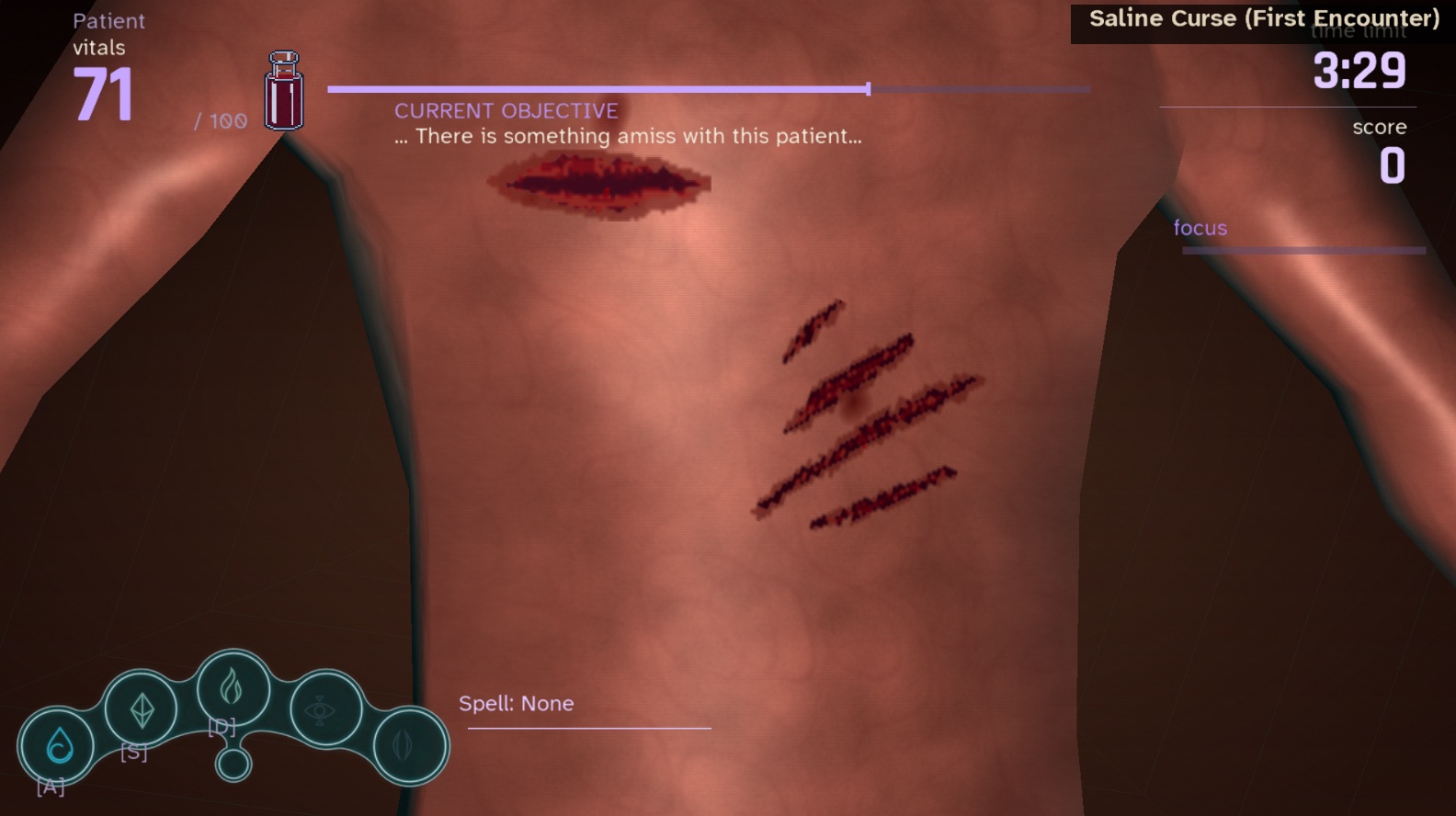
I start with where your pointer is on the screen. Transforming those coordinates through the inverse camera view/projection matrix gives me a near point and a far point. The 3D ray starts at the near point and heads towards the far one.
Then I check that ray against the triangles in the patient’s model. I take the nearest front-facing hit, or fall back to the nearest back-facing one if there isn’t a front-facing hit. That gives me the position and orientation of the surface you’re pointing at.
GML: constructing the 3D ray
scripts/scr_render_3d/scr_render_3d.gml, lines 491-502.
function unprojectCameraRay(canvasX, canvasY, viewportWidth, viewportHeight, inverseViewProjection) {
	var normalX = canvasX / viewportWidth * 2 - 1;
	var normalY = projectionVerticalSign() * (canvasY / viewportHeight * 2 - 1);
	var nearClip = matrix_transform_vertex(inverseViewProjection, normalX, normalY, 0, 1);
	var farClip = matrix_transform_vertex(inverseViewProjection, normalX, normalY, 1, 1);
	var nearPoint = vector3(nearClip[0] / nearClip[3], nearClip[1] / nearClip[3], nearClip[2] / nearClip[3]);
	var farPoint = vector3(farClip[0] / farClip[3], farClip[1] / farClip[3], farClip[2] / farClip[3]);
	return {
		origin:nearPoint,
		direction:vectorNormalize(vectorSubtract(farPoint, nearPoint))
	};
}
Selecting individual wounds
Each wound gets its own hit area, lined up with the surface it sits on. I check these separately and skip any wounds that are closed or inactive.
I find where the 3D ray meets the wound’s plane, then measure that hit along the tangent and bitangent. Those are the two directions across the surface. I also undo the wound’s rotation before checking whether the hit fits inside its rectangle, so a rotated wound still gets the right hit area.
GML: intersecting a rotated wound
scripts/scr_render_3d/scr_render_3d.gml, lines 534-552.
function raySurfaceAnchorHit(origin, rayDirection, anchor, rotation, halfWidth, halfHeight) {
	var denominator = vectorDot(rayDirection, anchor.normal);
	if(abs(denominator) <= 0.00001) return undefined;

	var distance = vectorDot(vectorSubtract(anchor.position, origin), anchor.normal) / denominator;
	if(distance <= 0) return undefined;

	var position = vectorAdd(origin, vectorScale(rayDirection, distance));
	var offset = vectorSubtract(position, anchor.position);
	var across = vectorDot(offset, anchor.tangent);
	var down = vectorDot(offset, anchor.bitangent);
	//undo the wound's draw rotation before checking its rectangular hitbox
	var cosine = dcos(rotation);
	var sine = dsin(rotation);
	var localAcross = across * cosine + down * sine;
	var localDown = -across * sine + down * cosine;
	if(!surfaceAnchorContains(localAcross, localDown, halfWidth, halfHeight)) return undefined;
	return {position:position, distance:distance, across:across, down:down};
}
If targets overlap, I need to pick one. This is how I decide:
- On the same patient, pick the wound whose centre is closest to your pointer.
- Between patients, pick the nearer surface hit by the ray.
GML excerpt: resolving overlapping targets
scripts/scr_wound_view/scr_wound_view.gml, lines 512-522.
//on one body choose the nearest centre; between bodies choose the front surface
var centre = renderer.projectAnchor(wound.anchor);
if(is_undefined(centre)) continue;
var aimDistance = point_distance(screenX, screenY, centre.x, centre.y);
if(!is_undefined(closest)) {
	if(closest.patient == bodyIndex) {
		if(aimDistance >= closest.aimDistance) continue;
	} else {
		if(woundHit.distance >= closest.distance) continue;
	}
}20-plus passes on spell recognition
Here I’m checking whether what you drew matches the spell you selected. This part uses your drawing’s screen coordinates. The 3D ray tests handle which wound you’re aiming at.
From rough shape checks to template matching
At first, I scored drawings by their width, height, path length and turn count. I ended up moving to template matching. I filter out points that are too close together, turn the stroke into 48 evenly spaced samples, then centre and scale it so I can compare it with a template.
The matcher lines up the rotation and tries both drawing directions. Drawing backwards is fine too! For a closed shape, it tries different starting points around the loop. Fire has zigzag templates with three, four or five segments, so you don’t have to count out one exact number of peaks.
GML: matching direction and starting point
scripts/scr_surgery_input/scr_surgery_input.gml, lines 185-196.
function bestGestureMatch(templatePoints, drawnPoints, closed){
	var count = array_length(templatePoints);
	if (count == 0 || count != array_length(drawnPoints)) return 1;
	var best = 1000000;
	var shiftCount = closed ? count : 1;
	for (var reverseIndex = 0; reverseIndex < 2; ++reverseIndex) {
		for (var shift = 0; shift < shiftCount; ++shift) {
			best = min(best, gestureMatchError(templatePoints, drawnPoints, reverseIndex == 1, shift));
		}
	}
	return best;
}
What needed more work
- Tiny hand movements were getting picked up too easily when I compared neighbouring samples. I widened the span used to detect turns, which helps separate a little wobble from an actual corner.
- I also check whether the drawing closes and whether it has the right features for the spell. Fire needs to go back and forth. Water has a limit on sharp turns, and Wind needs to wind far enough around the stroke’s centre.
- Circles needed another pass... you can finish a Water circle and carry on a little past where you started. I added a check that trims a small overlap within set limits, then runs the remaining recognition checks. It still sets a minimum error for grading, even if the trimmed circle matches well.
GML excerpt: trimming a small Water-rune overlap
scripts/scr_surgery_input/scr_surgery_input.gml, lines 345-349.
if(closeIndex >= 4 && overlap > 0.02 && overlap <= 0.20){
	array_resize(filtered, closeIndex + 1);
	metrics = strokeMetrics(filtered);
	overlapPenalty = 0.051 + max(0, overlap - 0.05) * 0.15;
}
Acceptance and grading
A drawing can be accepted without earning a high grade. Its grade depends on how closely it matches the spell’s shape. If the drawing is rejected, the player gets a shape hint such as “DRAW A CIRCLE” or “DRAW A SQUARE”.
Early on in development and tests, people didnt like the fact that we didnt say this for some reason!....
...
so we uhh had to add these hints.
yay
Wyrmrot: taking inspiration from Kyriaki
Wyrmrot was inspired by Kyriaki from Trauma Center. Kyriaki hides inside the patient and makes cuts, so you have to find it with ultrasound, expose it and use the laser on it. We wanted that pressure of trying to treat someone while a creature keeps hurting them, but we didn’t want to copy the whole encounter. For Wyrmrot, we went with a creature that makes a fake version of itself. Now you have to work out which one to burn.
Watching the little guy
It glides across the patient, leaves a cut and splits into two bodies that look alike. The real one moves faster and wanders further than the fake. You have a bit of time to watch them and draw a Fire spell on the real one, while the wounds are still there waiting for you.
If you pick the fake, the patient takes damage and Wyrmrot immediately flees. So you can’t just try both! If you run out of time, the patient takes damage and gets another cut. You need three successful purges to kill each Wyrmrot. After each one, it pauses less between attacks and gives you less time to pick.
How I made it work
I wrote the behaviour in GML using a state machine, so the code keeps track of what Wyrmrot is doing at that moment. It glides, cuts and splits, then there’s a window where you can treat it. If it survives, it flees, burrows and comes back up. I only let treatment happen while it’s split, and check that you’ve drawn a valid Fire gesture before applying it to the body you picked.
The real and fake bodies share a movement function. I give the real one a higher speed and a wider movement radius so you can tell them apart by watching. Its movement speeds up again with each successful purge.
GML excerpt: making the real body move differently
scripts/scr_curse_wyrmrot/scr_curse_wyrmrot.gml, lines 268-276.
var realSpeed = realJitterSpeed * power(realJitterScale, purgesLanded);
for(var i = 0; i < array_length(bodies); i++){
	var body = bodies[i];
	if(!body.alive) continue;
	var bodySpeed = body.isReal ? realSpeed : fakeJitterSpeed;
	var bodyRadius = body.isReal ? realJitterRadius : fakeJitterRadius;
	//the real body jitters faster and wider than its mirage
	advanceJitter(body, bodySpeed, bodyRadius, seconds);
}
When there’s more than one Wyrmrot, each keeps track of its own movement and how many times you’ve purged it. I use a separate encounter controller to manage the groups and check who’s still alive. Killing one can’t switch off the extra bleeding from the curse if another is still running around.
For the cuts, I use the patient’s 3D surface to place each wound and rotate it along the path Wyrmrot took. These go into the same wound system as the rest of the operation, so you still have to treat the mess it leaves behind.
More from Spell Tavern
Watch the game trailer
I also compose, arrange and produce music! The Spell Tavern soundtrack is here if you want a listen.